Search for the best field-service software for HVAC or plumbing companies and the same names come up every time: ServiceTitan, Jobber, Housecall Pro, FieldEdge, Workiz. monday.com is not on those lists. Not ranked low. Absent. Capterra's field-service management category does not include it at all.
That absence is most of the answer to the question in the title. But it deserves more than a one-word no, because monday.com is a genuinely strong product, and we keep meeting contractors who trialed it anyway, usually because a friend in an office job swears by it. So here is the honest version: where it works, where it breaks, and what to use instead.
What monday.com actually is
monday.com calls itself a work OS. In practice it is a system of boards, items, and columns that teams assemble into whatever they need: project trackers, content calendars, CRMs, ticket queues. The suite now spans five products, including monday CRM, and the 2026 positioning leans hard on AI agents. The company says most of the Fortune 500 use it; reviewers place it with small and mid-sized office teams that value a modern interface over deep specialization.
It is well liked: 4.6 out of 5 on Capterra across more than 5,600 reviews, 4.7 on G2 across more than 14,000. Any comparison that pretends monday.com is a bad product is not being straight with you.
Where it earns those ratings
monday.com is at its best when three things are true. You have an office team of five or more people doing knowledge work: marketing, operations, project coordination, an inside sales team. Someone on that team owns the setup, because boards do not configure themselves; the product rewards teams with a dedicated ops person and punishes teams without one. And your bottleneck is internal visibility: who is doing what, what is stuck, what ships this week. For that job it is excellent, and more pleasant to use than most direct competitors.
Where it can genuinely work for a construction business
The real version of the monday.com-for-construction story lives on the project side of the business. A design-build remodeler running three concurrent projects over several months can map each one to a board: demo, rough-in, inspection, finish, punch list. Selections and change orders become items with files and approvals attached. Permits, insurance certificates, and lien waivers get tracked instead of living in someone's inbox. Subcontractor coordination works too, because a shared board with status columns beats a group text once more than two subs are involved.
When projects are long and the people coordinating them sit at desks, the board model maps to reality; a custom home builder with a project manager and an office coordinator can genuinely live in it. The model inverts the moment work becomes many short jobs a day instead of a few long ones, which is where most contractors live.
Where contractors specifically run into trouble
Nobody owns the setup
A five-person HVAC company does not have an ops person who lives in a browser. The owner quotes jobs, runs crews, and does the books at night. monday.com hands that owner a blank canvas with more than two dozen view types and says build. Some owners enjoy that for a weekend. Very few sustain it for a year.
The do-it-for-me route is not cheap either: implementation partners quote real consultant money and multi-month timelines. The sticker price was never the problem. The setup burden is.
The field is not in the product
monday.com has no dispatching, no technician scheduling, no job costing, and no quote-to-invoice-to-payment chain built for the trades. There is no equipment or service history per address, so the second visit to the same house starts from a blank slate. There is no customer-facing booking page, no phone system, and no SMS; communication runs on email sync.
None of that is a missing feature on a roadmap. It is DNA. monday.com models work as items moving across boards. Field service is jobs at addresses, each with a customer, a crew, equipment, and money attached. Different problem, different product.
Capterra reviewers also flag the mobile app as much weaker than the desktop, with complex boards hard to manage from a phone. For an owner who lives in a truck, mobile is not an edge case. It is the whole product.
The AI works for whoever configures it
monday.com's AI agents are real and useful for office work: drafting content, triaging tickets, summarizing sales calls. They are metered by AI credits that scale with plan tier, and the owner configures them, supervises them, and pays for what they consume.
None of them answers your phone at 2 PM while the whole crew is on a roof. That distinction matters more than any feature list.
A five-person HVAC company does not need another board system to configure. It needs the phone answered while everyone is on a roof.
What contractors end up bolting on
Contractors who stay past the trial assemble the same stack around it. An estimating tool, because boards do not price jobs. QuickBooks for invoicing and payments. A scheduling app or a shared calendar for who is where tomorrow. A review-request tool. A phone and SMS layer. Then Zapier or Make gluing it together.
Each connection is a seam the owner now maintains. Rename a column and a zap breaks silently. The customer's history ends up split across four systems, so nobody can answer "what did we do at this address last year" without opening three tabs. That is the integration tax, and it usually costs more in hours and dropped handoffs than the software costs in dollars. We walked through the full math in what your software stack really costs.
The real cost for a five-person shop
Set the sticker aside: the pricing page is public, and the seat minimums and automation caps are sized for office workflows anyway. The real cost is the owner's hours plus the bottleneck the tool never touches.
The service businesses we audit leak real revenue every month in unanswered calls and quotes nobody chased, and a board system does not close that leak. A lead answered in minutes behaves nothing like a lead answered tomorrow. To see the leak in your own numbers, run the two-minute leak check.
Match the tool to the actual bottleneck
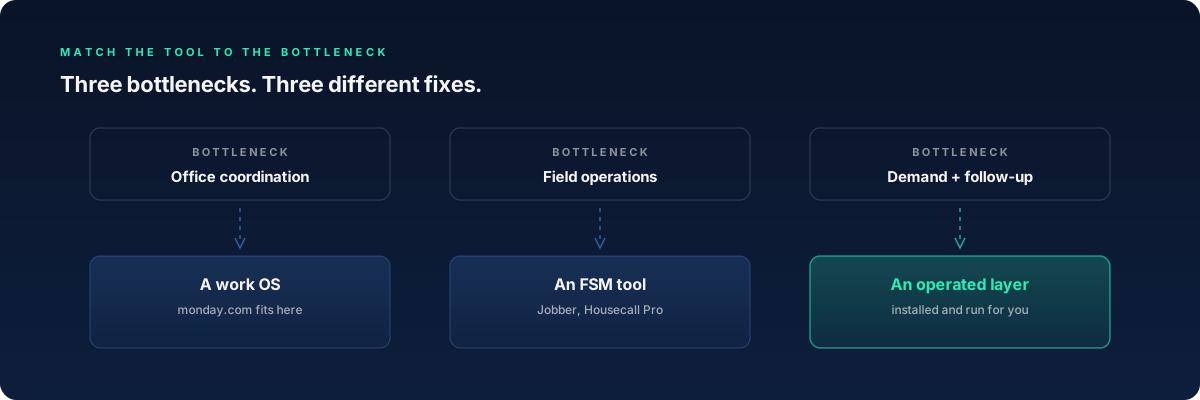
The question is never whether monday.com is good. It is which constraint your business has right now. We see three bottlenecks in contracting companies, each pointing to a different fix.
If your bottleneck is office coordination, a work OS is a reasonable buy, and monday.com is one of the better ones. That becomes real at five or more office staff, which most companies under roughly $3M in revenue do not have.
If your bottleneck is field operations, meaning scheduling, dispatch, quoting, invoicing, and getting paid, you want field-service management software, not a work OS. That category was built for the trades: Jobber, Housecall Pro, and at real scale ServiceTitan. Our comparison hub breaks down what each genuinely does well.
If your bottleneck is demand and follow-up, meaning leads going unanswered, quotes never chased, and reviews never requested, no software category fixes it, because the missing ingredient is not features. It is someone doing the work. That is the gap an operated layer fills. DECO installs the Growth Operating System and then runs it: every inbound lead gets an answer in seconds, gets qualified inside about 90 seconds, and lands in a follow-up sequence that someone actually works. Plenty of shops run an FSM tool and DECO side by side. You can see everything the DECO Team installs.
Questions contractors ask
Can you run a construction company on monday.com?
You can run the project-management side of one, and some general contractors and remodelers do. You cannot run the whole company on it: estimating, invoicing, payments, dispatch, and customer records live elsewhere, so companies that try end up running monday.com plus three or four other tools.
Is monday.com a CRM for contractors?
monday CRM is a real sales CRM, and a reasonable one for an office sales team. It is not a contractor CRM: it does not know what a job is, keeps no service history per address, and does not tie a quote to an invoice to a payment.
Is monday.com good for scheduling crews and dispatch?
Timeline and calendar views work fine for week-level crew planning on long projects, but it cannot dispatch: no capacity per technician, no routing, no on-my-way texts, no mobile experience built for a tech in a driveway. For same-day service work, that gap is the whole job.
What do contractors use instead of monday.com?
It depends on the bottleneck: field-service management software (Jobber, Housecall Pro, or ServiceTitan at scale) for field operations, a work OS for office coordination, and an operated layer for lead response and follow-up. Our four-platform breakdown sorts those choices by revenue stage.
The honest verdict
monday.com is the better choice when you have an office team of five or more, someone willing to own setup and upkeep, and a bottleneck of internal project visibility. On a long construction project with an office project manager, it can genuinely carry the coordination load. Inside that lane, it earns its ratings.
It was not built for contractors doing service work, and the buyers' guides that rank field-service tools do not list it. If your crew is in the field and the phone is ringing unanswered, the fix is not a better board or more software. It is installed infrastructure with someone operating it. That is what the DECO Team does, which is why we will tell you plainly when monday.com, or Jobber, or nothing new at all, is the right answer for your stage. If you are still comparing, start with which platform fits a $1-5M service business, or get the short version on /plans.
Keep reading

Comparisons
Jobber vs HubSpot vs ServiceTitan vs GHL: which fits a $1-5M service business
10 min readThe DECO Team