
The arc is so common it has a rhythm. Week one: you buy the CRM, sit through onboarding, import a couple thousand contacts from the spreadsheet that ran the business until now. Week two: the team adds deals, mostly, when reminded. Week six: an estimate goes out without getting logged because the crew was slammed and logging felt optional. Month three: the pipeline shows fourteen open deals and you know nine of them are dead, you just have not had time to mark them. Month four: you stop opening it. The team notices within days. The subscription keeps billing.
What you have now is not a CRM. It is a graveyard. Hundreds of contacts nobody messages. Deal stages frozen where they stood in February. Notes that end mid-sentence. And the usual response, shopping for a replacement with better reviews, almost always produces a second graveyard with a different logo on the login screen.
The distinction that decides whether a CRM lives or dies is not features, price, or ease of use. It is who does the operating after the install. There are exactly three answers to that question, and they produce three very different outcomes.
How the graveyard forms
CRMs do not die in a crash. They decay quietly, in a sequence we see over and over in the service businesses we audit.
- Entry friction wins a few small battles. Someone is on a roof or under a sink, and the new lead goes into a text thread instead of the pipeline. Nobody decides to abandon the system. They defer it, once. Then once more.
- The data goes stale enough to stop being trusted. A pipeline that is 80 percent accurate is useless for decisions, because you cannot tell which 20 percent is fiction. The first time you double-check the CRM against reality, the CRM has lost its job.
- The team reads the signal. When the owner stops running Monday meetings from the pipeline, updating it becomes performative. Performative work is the first thing a busy crew drops.
- The tool becomes a contact archive with a monthly fee. Nobody cancels it, because canceling feels like admitting the money was wasted. It just sits there, renewal after renewal.
None of those steps is a software failure. The software did what software does: it stored exactly what people put into it, which over time approached nothing. The pattern shows up plainly in user reviews of the field-service tools themselves. Third-party review roundups of Housecall Pro, to take one example, describe marketing features sitting unused and adoption falling entirely on the owner. The tools are not lying about their features. The features just do not operate themselves.
The three modes of CRM ownership
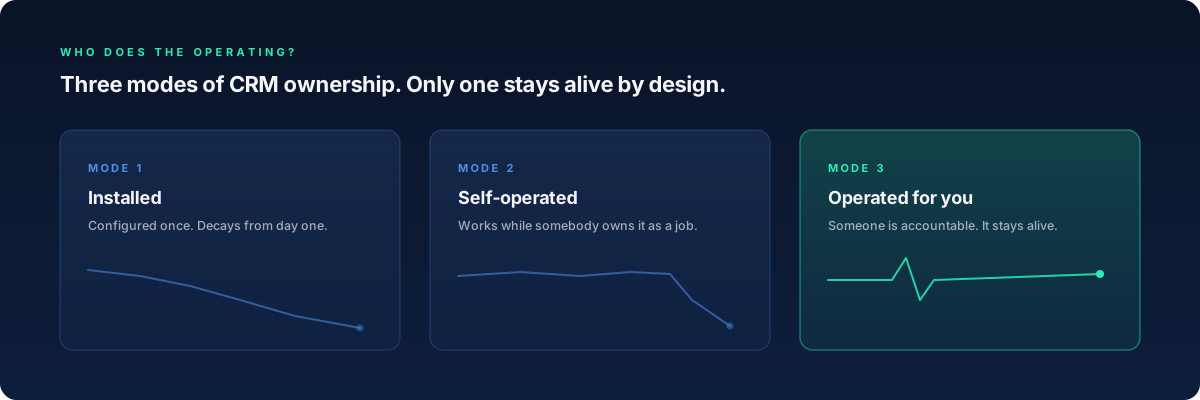
Mode 1: installed
Somebody, maybe you, maybe an onboarding rep, configured the pipelines, the custom fields, the automation triggers. Then the project ended. From that moment the system only decays. Every new service you offer, every staffing change, every price update makes the configuration slightly more wrong, and there is no force pushing it back toward accurate. Configuration was a project, and projects end.
This is the default mode for most CRM purchases in the trades, which is why the graveyard outcome is the normal outcome, not the exception.
Mode 2: self-operated
The system works because a specific person owns it as a named part of their job. They chase the crew for updates, archive dead deals every week, fix the automation when the booking link changes, and run meetings from the pipeline so the data stays load-bearing.
This mode genuinely works. We have seen office managers run a CRM beautifully for years. But notice what is carrying the load: a person. The mode holds exactly as long as that person has the hours, keeps the role, and does not get pulled into dispatch during the busy season. When they leave or get reassigned, you do not return to a neutral state. You return to decay, on a delay measured in weeks.
Mode 3: operated for you
Someone outside your payroll is accountable for the system staying alive. Responses go out, stages reflect reality, dead leads get recycled into reactivation campaigns, and reporting lands on your desk without you asking for it. Your job shifts from performing data entry to inspecting outcomes.
This is the mode DECO sells. We install a central command center on your business, the pipelines, the missed-call text-back, the qualification flows, the review engine, and then our team operates it week after week. Not because the operating work is glamorous, but because it is the part that determines whether any of it produces revenue.
A CRM is not a product you buy. It is a job you staff. The graveyard is what the job looks like when nobody holds it.
The honest part: this is a staffing failure, not a tool failure
It would be convenient for us to tell you the CRM you bought is bad. It is probably fine. Jobber, Housecall Pro, ServiceTitan, HubSpot, GoHighLevel: all of them can hold a pipeline, fire an automation, and log a call. If your CRM is a graveyard, the tool did not fail you. A job went unstaffed.
Operating a CRM for a service business is real work on a real weekly cadence: triage new leads, push stalled deals, prune dead ones, verify the automations still fire, reconcile the pipeline against the bank account. Call it three to six focused hours a week, more in season. The day you bought the CRM, that job was created. Nobody was hired into it. The work defaulted to you, the person whose calendar was already the bottleneck, which means it defaulted to no one.
So before you switch tools, answer the staffing question first. Whose name is on the operating job? If the answer is "the team" or "everyone," you have your diagnosis, and a new tool will not treat it.
What operated looks like in week twelve
The difference between the modes shows up not at kickoff, when everything looks alive, but around week twelve, when an installed system has already started to rot.
In an operated system, a missed call gets a text back in seconds, every time, because no human has to remember to send it. New leads get qualified within about 90 seconds of first contact, so the pipeline fills itself with structured data instead of waiting for someone to type. The market research here is blunt: industry studies have found that responding within five minutes makes a lead roughly nine times more likely to convert, and that consistent five-minute response saves 30 to 40 percent of the leads that would otherwise leak. For a typical home-service business, that leak is worth $10K to $50K a year.
The graveyard itself turns out to be an asset. Those hundreds of stale contacts are people who already raised their hands once. Run properly, structured reactivation campaigns recover 25 to 35 percent of cold leads into live conversations. The deals frozen in February are not all dead. They were unattended.
None of this requires you, or your office manager, to remember anything on a Tuesday afternoon. That is the entire point of mode three.
Choosing your mode on purpose
All three modes are legitimate. The failure is choosing mode one by accident while believing you chose mode two.
If you have a genuinely staffed operator, a person with hours, a mandate, and a name, mode two is the cheapest path. Protect that person's hours like revenue, because they are.
If you are evaluating tools right now, evaluate through the operating lens rather than the feature lens. Our comparison pages break down the major options on exactly this question: what the tool does, versus what still lands on you afterward.
And if you want the job staffed without hiring for it, that is the shape of our plans. Foundation Install starts at $297 per month for the build itself. The operated tiers, AI Employee at $597 and Automation Engine at $997, are where the staying-alive part lives.
The CRM graveyard is not a verdict on you. The industry sells tools, quietly leaves the operating job unstaffed, then sells the next tool when the first one decays. You break the loop by staffing the job, in whichever mode fits. And if this pattern feels adjacent to your hiring decisions, the companion read is why hiring another salesperson does not fix a revenue plateau, which is the same unstaffed-job failure wearing a different costume.
Keep reading

Comparisons
Jobber vs HubSpot vs ServiceTitan vs GHL: which fits a $1-5M service business
10 min readThe DECO Team